
GCCS1 Logistics labels for incoming goods
Create your labels here
This online tool allows you to generate the labels you need for shipping products to our warehouse.
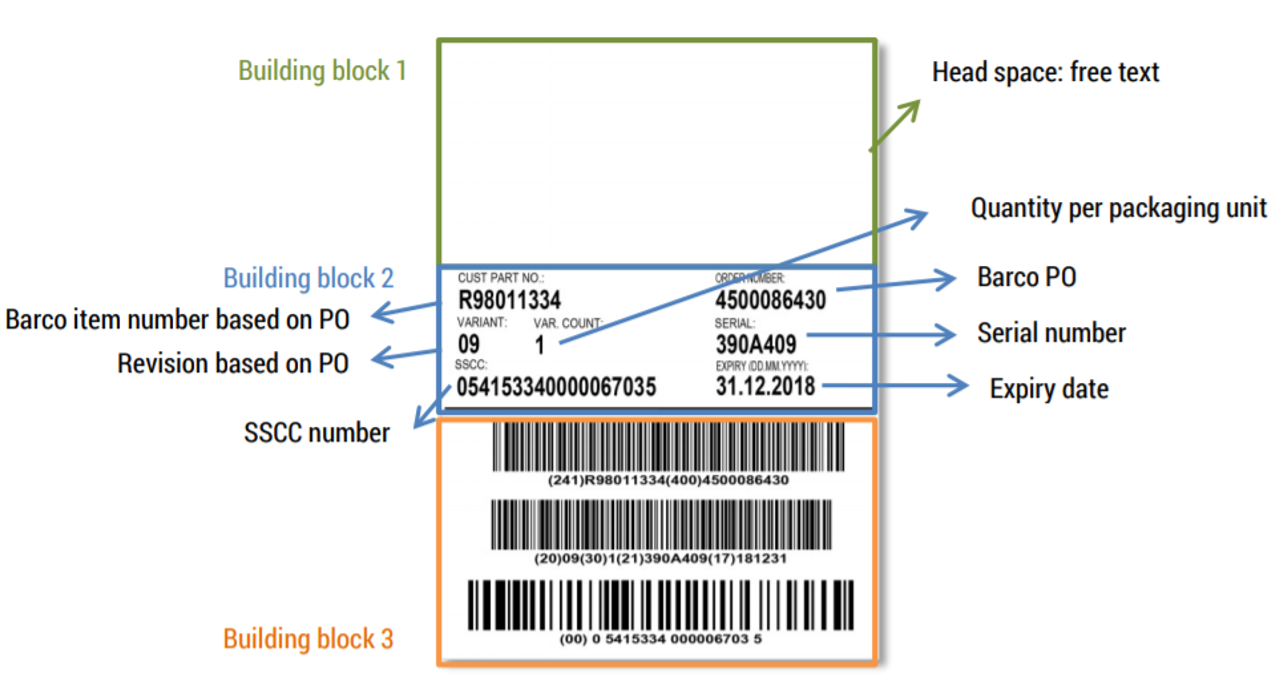
Simply fill out the fields below, and a GS1-compliant label will be automatically generated in a PDF file with up to 4 labels per page.
Print out the labels on self-adhesive (waterproof) A6 labels in the A4 paper format.
The Barco guidelines and information about the layout and content can be found on this page under the section "Quality Acceptance Manual Packaging"
| Cust. part no* | Order number | Variant | Var. count* | Serial | Expiry | Head space | # labels | |
|---|---|---|---|---|---|---|---|---|
| no labels | ||||||||
|
|
|
|
|
|
|
|
|
|
- When an input field turns red, it means the content is invalid. Correct the error by reading the instructions given in the red field
- Hover over the question mark tooltip for more information on how to fill out the fields
- Choose ‘Add line’ when you want to add a new label
- Choose ‘Generate labels’ when you want to create a PDF file with all labels
- Please note no changes or data will be saved when leaving the page
Additional info on GS1
The logistics label aims to accelerate the delivery process for incoming goods and contributes to efficient tracking and tracing.
All labels for incoming goods should follow the recommendations and standards of the GS1 organization.
More specifically the GS1 Logistics Label Guideline is relevant for the incoming goods labeling.